
Mecanum Drive
Learn how mecanum drive works and when to use it.
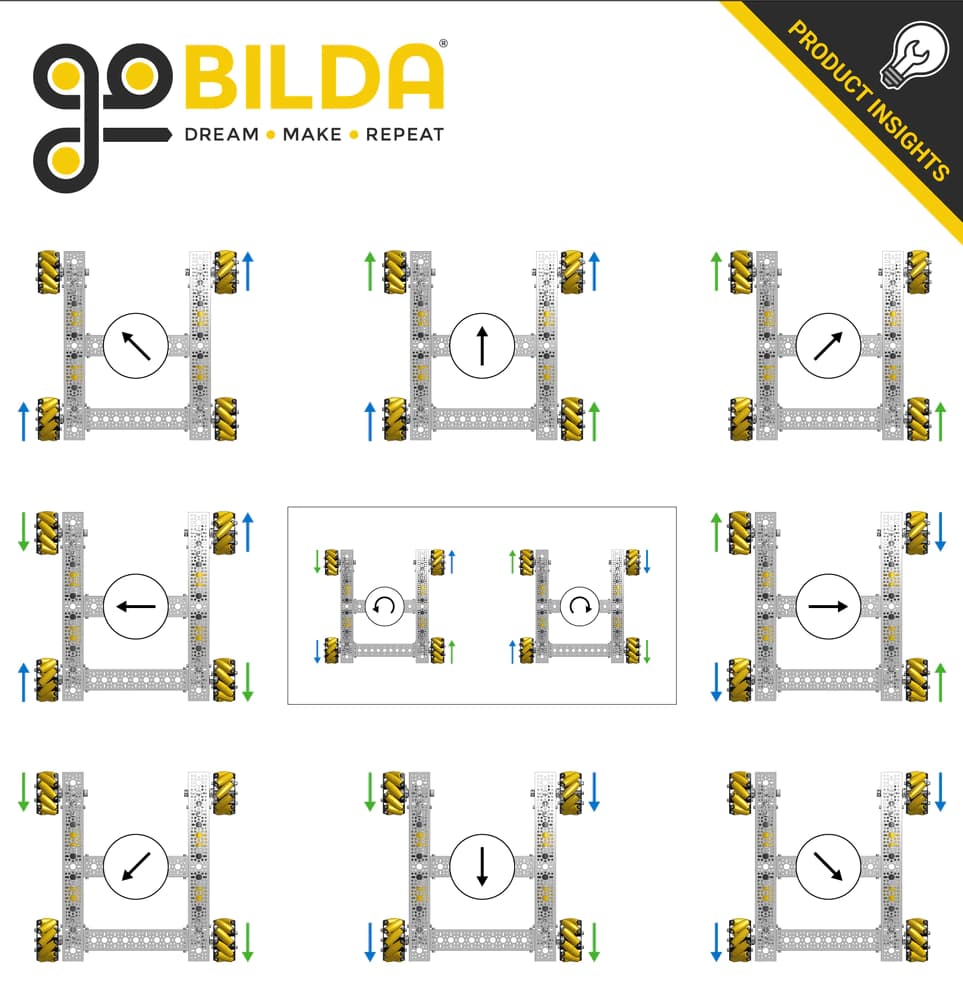
Mecanum drive is the most common drivetrain used in competitive FTC. Unlike a traditional tank drivetrain, a mecanum drivetrain is holonomic, meaning it can move in any direction while rotating at the same time.
With four mecanum wheels, your robot can:
- Drive forwards and backwards
- Strafe left and right
- Move diagonally
- Rotate in place
- Translate and rotate simultaneously
This additional freedom of movement allows drivers to align with game elements more quickly and precisely than a traditional drivetrain.
How Mecanum Wheels Work
Unlike standard traction wheels, mecanum wheels have rollers mounted at a 45° angle around the wheel.
Instead of applying force directly in the direction the wheel is facing, each wheel produces a force vector at a 45° angle. By combining the forces generated by all four wheels, the robot can move in nearly any direction.
A standard mecanum drivetrain uses an X configuration, where the rollers point toward the center of the robot when viewed from above.
Robot-Centric Drive
The simplest way to control a mecanum drivetrain is robot-centric drive.
In this control scheme:
- Left stick Y controls forward and backward movement.
- Left stick X controls strafing.
- Right stick X controls rotation.
The joystick directions are interpreted relative to the robot itself.
For example, pushing the joystick forward always moves the robot toward its own front, regardless of which direction it is facing on the field.
Deriving the Drive Equations
If you've implemented arcade drive before, mecanum follows the same basic idea.
Forward movement contributes equally to every wheel.
double y = -gamepad1.left_stick_y;Rotation speeds up one side of the drivetrain while slowing down the other.
double rx = gamepad1.right_stick_x;Finally, strafing adds power to one diagonal pair of wheels while subtracting power from the other.
double x = gamepad1.left_stick_x;Combining all three components produces the motor powers.
double frontLeftPower  = y + x + rx;
double backLeftPower   = y - x + rx;
double frontRightPower = y - x - rx;
double backRightPower  = y + x - rx;
These equations allow the robot to drive in any direction while rotating at the same time.
Improving Strafing
Because of friction, mecanum drivetrains usually strafe slightly slower than they drive forward.
Many teams compensate by slightly increasing the joystick's X value before calculating the wheel powers.
double x = gamepad1.left_stick_x * 1.1;The exact multiplier depends on your drivetrain and driver preference.
Normalizing Motor Powers
The equations above can sometimes produce values outside the valid motor power range of -1.0 to 1.0.
For example:
Front Left:  1.4
Back Left:   0.7
Front Right: -0.2
Back Right:  1.1
If these values are sent directly to the motors, the FTC SDK clips them to ±1.0. This changes the ratio between the wheels and causes the robot to move differently than intended.
Instead, divide every wheel power by the largest possible magnitude whenever necessary.
double denominator =
    Math.max(Math.abs(y) + Math.abs(x) + Math.abs(rx), 1);

double frontLeftPower  = (y + x + rx) / denominator;
double backLeftPower   = (y - x + rx) / denominator;
double frontRightPower = (y - x - rx) / denominator;
double backRightPower  = (y + x - rx) / denominator;
This preserves the intended direction while ensuring every motor remains within the allowed power range.
Robot-Centric Example
Putting everything together gives us a complete robot-centric drive implementation.
double y = -gamepad1.left_stick_y;
double x = gamepad1.left_stick_x * 1.1;
double rx = gamepad1.right_stick_x;

double denominator =
        Math.max(Math.abs(y) + Math.abs(x) + Math.abs(rx), 1);

double frontLeftPower  = (y + x + rx) / denominator;
double backLeftPower   = (y - x + rx) / denominator;
double frontRightPower = (y - x - rx) / denominator;
double backRightPower  = (y + x - rx) / denominator;

frontLeftMotor.setPower(frontLeftPower);
backLeftMotor.setPower(backLeftPower);
frontRightMotor.setPower(frontRightPower);
backRightMotor.setPower(backRightPower);
Field-Centric Drive
Robot-centric controls work well, but they require the driver to constantly think about the robot's orientation.
Imagine your robot has rotated 180°.
If the driver pushes the joystick forward, the robot moves toward the driver instead of away from them.
Field-centric driving solves this problem.
Instead of interpreting the joystick relative to the robot, the joystick is interpreted relative to the field.
This means:
- Pushing forward always moves away from the driver station.
- Pushing left always moves toward the left wall.
- The controls remain consistent no matter which direction the robot is facing.
Many competitive teams prefer field-centric controls because they are easier to drive under pressure.
How Field-Centric Works
Field-centric drive uses the robot's heading from the IMU.
Each loop:
- Read the robot's heading.
- Rotate the driver's translation vector by the opposite of that heading.
- Calculate the motor powers using the same mecanum equations as robot-centric drive.
The only additional mathematics required is a two-dimensional vector rotation using sine and cosine.
Implementing Field-Centric Drive
First, read the robot's current heading from the IMU.
double heading = imu.getRobotYawPitchRollAngles()
        .getYaw(AngleUnit.RADIANS);
Next, rotate the joystick vector by the negative of the robot's heading.
double rotX = x * Math.cos(-heading) - y * Math.sin(-heading);
double rotY = x * Math.sin(-heading) + y * Math.cos(-heading);
To compensate for imperfect strafing, many teams also apply a small multiplier.
rotX *= 1.1;Finally, substitute the rotated joystick values into the same mecanum equations.
double denominator =
        Math.max(Math.abs(rotY) + Math.abs(rotX) + Math.abs(rx), 1);

double frontLeftPower  = (rotY + rotX + rx) / denominator;
double backLeftPower   = (rotY - rotX + rx) / denominator;
double frontRightPower = (rotY - rotX - rx) / denominator;
double backRightPower  = (rotY + rotX - rx) / denominator;

frontLeftMotor.setPower(frontLeftPower);
backLeftMotor.setPower(backLeftPower);
frontRightMotor.setPower(frontRightPower);
backRightMotor.setPower(backRightPower);
The only difference between robot-centric and field-centric drive is rotating the joystick vector before calculating the motor powers.
For more information about configuring and initializing the IMU, see the IMU page in the SDK Basics section.
Robot-Centric vs. Field-Centric
| Robot-Centric | Field-Centric |
|---|---|
| Simpler to implement | Requires an IMU |
| Easier to understand | Easier for drivers to learn |
| Controls depend on robot orientation | Controls always match the field |
Best Practices
- Normalize motor powers before sending them to the motors.
- Apply a small strafing multiplier if your robot drifts while strafing.
- Verify that your motor directions are configured correctly.
- Add joystick deadzones to eliminate unwanted movement.
- Consider adding a slow mode for precise alignment.
- Provide a way to reset the IMU heading during a match if using field-centric drive.
Was this resource helpful?